Wedding Organizer Postcard: A Smart Tool for Planning
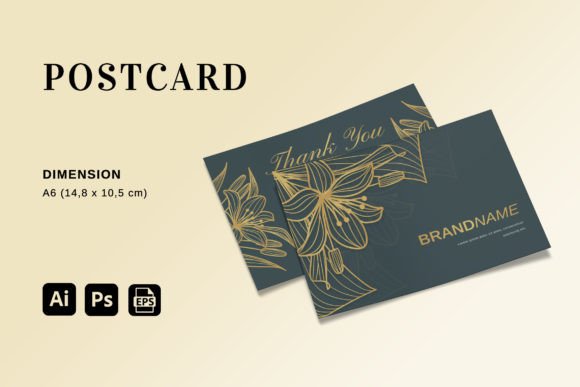
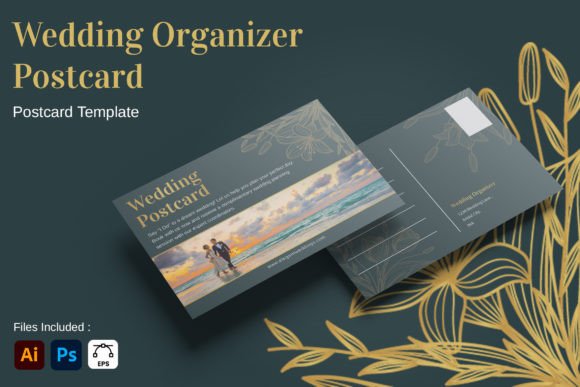
Planning a wedding is an exercise in managing chaos. Between coordinating vendors, tracking guest lists, and managing timelines, the details can easily become overwhelming. This is where the Wedding Organizer - Postcard steps in as a practical solution. It is not just a static image; it is a professionally designed template that transforms complex planning data into a clear, actionable format. By offering a landscape A6 layout with a unique structure, this tool bridges the gap between digital spreadsheets and physical memory.
The core value of this postcard lies in its accessibility. Whether you are a professional event planner looking to streamline client handovers or a couple organizing their own nuptials on a budget, the design prioritizes ease of use. You do not need to be a graphic design expert to make this work. The interface allows you to simply enter your text and finalize your document. This "enter and done" philosophy ensures that the focus remains on the content—the names, dates, and logistics—rather than wrestling with software features.
Creative Possibilities and Applications
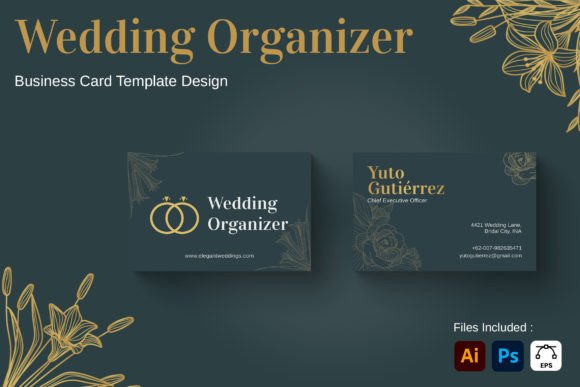
While the primary function is organization, the Wedding Organizer - Postcard opens doors for various creative interpretations. Its versatility stems from the fact that it serves multiple roles in the wedding ecosystem. For instance, it can act as a high-end agenda for guests, detailing the flow of events for the ceremony and reception in a compact, pocket-friendly size. Alternatively, it can serve as a branded identity piece for wedding planners, showcasing their services and contact information alongside a sample schedule.
Consider the scenario of a destination wedding. In these situations, guests often receive a large booklet of information. A postcard format offers a sleek, minimalist alternative. You can distill the essential travel details, accommodation codes, and itinerary highlights onto a single card. This reduces paper waste while ensuring that critical information is immediately visible. The landscape orientation of the A6 paper (5.83 x 4.13 inches) provides ample horizontal space to create wide, readable tables or timelines that would be cramped in a portrait format.
For small business owners and freelancers, this template is a powerful branding asset. Imagine using the same layout to create a "Save the Date" that doubles as a functional organizer. Or, perhaps you are a blogger writing about wedding trends; this postcard can be used to illustrate how modern couples are simplifying their planning processes. The clean lines and professional layout allow the design to adapt to different color palettes and typography styles without losing its structural integrity.
Adapting for Different Audiences
The beauty of this tool is its ability to scale from personal projects to commercial ventures. Let's look at how different users can leverage the Wedding Organizer - Postcard:
- Entrepreneurs and Planners: Use the fully editable layers to create a standard operating procedure (SOP) card for clients. Include sections for vendor contacts, payment deadlines, and emergency protocols. This adds a layer of professionalism and reassurance to your service.
- Educators and Hobbyists: If you are teaching a course on event management, this template can serve as a worksheet. Students can fill out the fields to practice creating realistic schedules and budgets.
- Publishers and Marketers: Create a series of themed postcards for a marketing campaign. Each card could represent a different phase of wedding planning, such as "Venue Selection," "Catering," or "Attire," driving traffic to a website or blog.
The key to success here is consistency. When adapting the template, ensure that the font choices and color schemes align with the overall theme of the event or brand. The included help file and well-organized layers make it easy to maintain this consistency across multiple documents. You can create a set of matching cards for the entire wedding weekend, ensuring that every touchpoint feels cohesive.
Technical Specifications and Workflow
To get the most out of the Wedding Organizer - Postcard, understanding the technical specifications is crucial. The file is provided in AI (Adobe Illustrator), PSD (Adobe Photoshop), and EPS formats. This multi-format support ensures compatibility regardless of your preferred software. If you prefer vector editing for crisp scalability, the AI and EPS files are ideal. For those who rely on pixel-based manipulation or specific photo effects, the PSD file offers full control.
The print-ready nature of the template is a significant advantage. It comes pre-configured for CMYK color mode and 300 DPI resolution, which are the industry standards for high-quality printing. This means you can send the file directly to a printer without worrying about color shifts or blurriness. The dimensions are set to Landscape A6, a size that fits perfectly in wallets, envelopes, or invitation suites.
One important note for users is that preview images are not included in the download. This requires you to open the source files to see the final result. While this might seem like a minor inconvenience, it actually encourages you to engage more deeply with the design. You are forced to edit the layers to visualize the outcome, which often leads to better customization. The free fonts used in the template also simplify the process, as you won't encounter missing font errors when opening the file on a different machine.
Maintaining Clarity and Effectiveness
In the world of event planning, clarity is king. A cluttered postcard defeats the purpose of organization. When editing the Wedding Organizer - Postcard, resist the urge to overfill the available space. Use the layout to guide the eye naturally. Start with the most critical information, such as the date and time, followed by location details. Use strong headings and bullet points to break up text blocks.
Consistency in typography is another area to watch. Stick to the fonts provided or choose complementary alternatives that match the mood of the wedding. Avoid mixing too many typefaces, as this can create visual noise. The goal is to create a document that is easy to read at a glance. If you are including photos, ensure they are high-resolution and properly cropped to fit the designated areas within the layers.
For those working on a tight deadline, the "easy to edit" feature is a lifesaver. You can quickly swap out placeholder text for real data and adjust colors to match the wedding palette in minutes. This efficiency allows you to focus on the bigger picture of the event rather than getting bogged down in technical design issues. Whether you are producing a handful of cards for a small intimate gathering or hundreds for a large celebration, the workflow remains streamlined.
Final Thoughts on Creative Organization
The Wedding Organizer - Postcard represents a thoughtful approach to problem-solving in event design. It combines the utility of a checklist with the aesthetic appeal of a printed piece. By providing a robust, editable foundation, it empowers users to take control of their planning narrative. From the busy freelancer needing a quick turnaround to the meticulous planner seeking perfection, this template offers a flexible framework that adapts to your needs.
Remember that the best designs are those that serve their purpose effectively. This postcard does exactly that: it organizes, informs, and inspires. With its professional layout, print-ready specs, and user-friendly structure, it stands out as a valuable resource in the toolkit of any creative professional. Embrace the opportunity to create something that is both beautiful and functional, turning the stress of planning into a structured and enjoyable experience.